How I built a production-grade AI content engine with parallel pipelines, adaptive RAG, and a verification system that flags its own claims.
The Project That Started With a Deadline
In early 2026, Wealthsimple ran a program called AI Builders. The prompt was this: design and prototype an AI system that meaningfully expands what a human can do. That might mean rebuilding a legacy workflow, handling more complexity, serving more people, or making higher-quality decisions. No spec, no rubric, no preferred stack.
I saw the posting three days before the deadline.
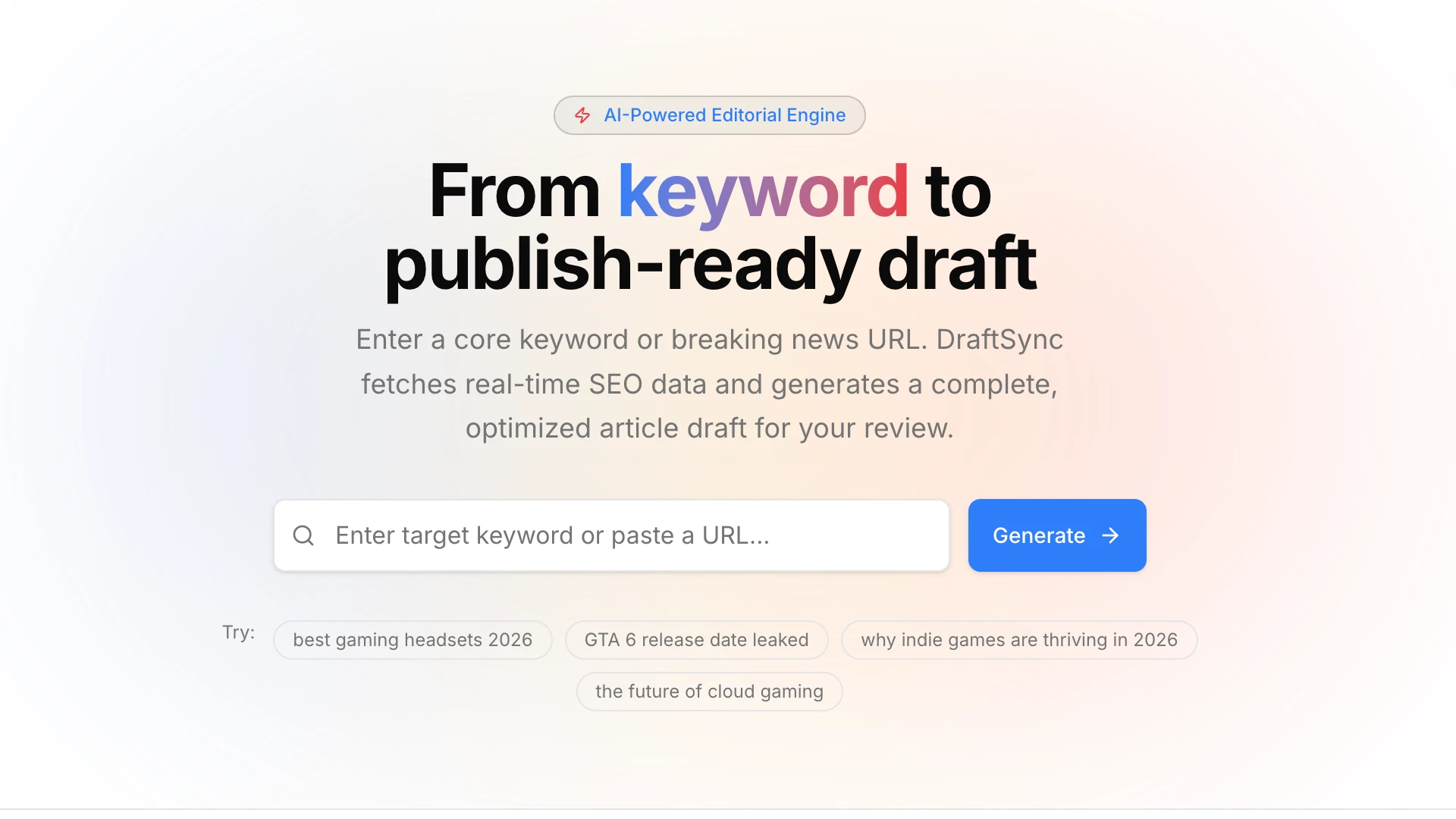
The project I built is called DraftSync. It is an AI-native editorial production engine that ingests real-time SEO intelligence, retrieves editorial style context from a vector database, generates complete article drafts with header images, flags its own uncertain claims for human review, and publishes directly to a WordPress CMS. All of it runs in parallel where possible and degrades gracefully where it must.
I did not get into the program. But the engineering decisions I made in those three days represent the kind of AI systems I believe in building: systems that are honest about their limits, resilient under failure, and designed for humans to stay in the loop. I have written before about where AI actually helps in a content workflow: the strongest use case is drafting and structure generation, not final publication. DraftSync is that insight turned into a production system.
What DraftSync Does
The core user flow is deceptively simple:
Enter a keyword -> AI generates a complete draft + header image -> Review, verify, edit -> Publish to WordPress
An editor types a keyword like "PlayStation Store update November 2025" into a single input field and hits generate. Behind that one action, four things happen in parallel:
- SEO intelligence is fetched from SerpApi: search volume, related keywords, competitor headings, SERP features. Search intent is the piece of SEO that separates content that compounds from content that plateaus, and the SerpApi data gives the generation prompt a direct line to what people are actually searching for.
- A header image is generated through a two-stage AI pipeline: GPT-5 Mini writes a visual brief, then FLUX.1-Kontext-pro renders it.
- Style context is retrieved from a Supabase pgvector database: the system embeds the keyword, finds the three most stylistically similar articles from the publication's archive, and injects them into the generation prompt.
- The article draft is streamed to the screen via the Vercel AI SDK, with uncertain claims wrapped in
[[VERIFY: ...]]markers.
The editor then works through three side panels: a metadata editor for SEO title, slug, and description; a verification panel that lists every flagged claim with approve, edit, or Google-search actions; and an SEO panel showing live SERP data with freshness timestamps. When they are satisfied, one click pushes the draft to WordPress as a proper post with a featured image. The metadata editor enforces the same on-page SEO checklist I recommend for manual publishing: title tag length, description relevance, and keyword placement.
Architecture at a Glance
The stack is a Next.js 16 App Router application with TypeScript in strict mode. Here is how the layers fit together:
- Frontend: Next.js 16, React 19, Tailwind CSS v4, shadcn/ui (New York style), Radix UI primitives
- AI Orchestration: Vercel AI SDK v6, routing to three providers
- Text Generation: GPT-5 Mini via Azure OpenAI, with a two-deployment retry chain and a fallback draft scaffold
- Image Generation: FLUX.1-Kontext-pro via Azure AI Foundry, with three-step retry backoff and a Picsum fallback
- Embeddings: Azure OpenAI
text-embedding-3-small(1536 dimensions) - Vector Database: Supabase pgvector with IVFFlat index and cosine similarity search
- Database: Supabase PostgreSQL for draft history, with localStorage fallback
- SEO Data: SerpApi with mock data fallback for development
- CMS Target: WordPress REST API with Markdown-to-HTML conversion and featured image upload
- RAG Ingestion: A standalone script that chunks WordPress posts, generates embeddings in batches of 100, and upserts into pgvector
The architecture is deliberately decoupled. No pipeline blocks another. If the image generation fails, the draft still streams. If the RAG retrieval returns nothing, generation proceeds without style context. If Supabase is unreachable, drafts save to localStorage. The system is designed to always produce something useful, never an error screen.
Deep Dive 1: Parallel Non-Blocking Pipelines
The hardest latency problem in AI applications is that everything takes time. A language model call might take 15 seconds. An image generation might take 20. A vector search might take 2. If you run them sequentially, the user waits 40 seconds before seeing anything.
The handleGenerate function in src/app/page.tsx solves this by treating each pipeline as an independently scheduled task with its own failure mode:
const handleGenerate = async () => {
    // Fire-and-forget: image generation runs detached
    const imageTask = fetchImage(keyword).catch(err => {
        console.warn("[image] Non-fatal image fetch error:", err);
    });

    // AWAIT: SEO data enriches the generation prompt, so it blocks
    const seoRes = await fetch("/api/seo", {
        method: "POST",
        body: JSON.stringify({ keyword }),
    });
    setSeoData(seoJson);

    // Fire-and-forget: text generation streams via useCompletion hook
    void complete(keyword, { body: { seoData: seoJson } })
        .catch(err => console.warn("[generate] Failed to start:", err));

    // Fire-and-forget: RAG context is metadata-only, non-blocking
    fetch(`/api/rag/context?keyword=${encodeURIComponent(keyword)}`)
        .then(r => r.json())
        .then(d => { if (d.active && d.matches?.length) setRagMatches(d.matches); })
        .catch(err => console.warn("[rag] Non-fatal:", err));
};
The sequencing is deliberate. SEO data is awaited because the generation prompt needs it. Everything else runs detached. The user sees the SEO panel populate first, then the draft starts streaming, then the header image appears when ready, then the RAG provenance badges arrive last. The perceived latency is the time of the slowest individual component, not the sum of all of them.
Each pipeline also carries its own error boundary. A failed image generation does not block the draft. A failed RAG query does not block the image. The catch handlers log warnings and move on. This is not a pattern you reach for in a demo. It is a pattern you reach for when you want the system to keep working under partial failure.
Deep Dive 2: The Retry Chain and the Fallback Draft
Language model APIs fail. They rate-limit, they time out, they return empty responses. A production system cannot just throw up its hands and show a 500 page.
The generation endpoint at src/app/api/generate/route.ts implements a cascading retry chain with a structured fallback:
const attempts: Array<{ deployment: string; backoffMs: number }> = [
    { deployment: primaryDeployment, backoffMs: 0 },       // immediate
    { deployment: primaryDeployment, backoffMs: 1200 },    // +1.2s backoff
];

if (secondaryDeployment && secondaryDeployment !== primaryDeployment) {
    attempts.push({ deployment: secondaryDeployment, backoffMs: 1800 });
}

for (const attempt of attempts) {
    if (attempt.backoffMs > 0) await sleep(attempt.backoffMs);
    try {
        const result = await generateText({ /* ... */ });
        return new Response(output, {
            headers: { "x-draft-source": "ai", "x-draft-model": attempt.deployment },
        });
    } catch (error) {
        if (!isRetryableGenerationError(error.message)) break;
    }
}

// All retries exhausted: build a structured fallback
const fallback = buildFallbackDraft(keyword, seoData);
return new Response(fallback, {
    headers: { "x-draft-source": "fallback", "x-draft-fallback-reason": lastErrorMessage },
});
The retry detection is explicit rather than catch-all. Only transient errors trigger a retry: rate limits, timeouts, temporary overloads, aborted connections. Permanent errors like invalid requests or authentication failures break the loop immediately. This avoids wasting time on retries that cannot succeed.
The fallback draft is not a generic error message. The buildFallbackDraft function uses whatever SEO data was already fetched to scaffold a structured markdown document with section headings, SERP-informed angles, and [[VERIFY]] markers on every claim. The editor gets something to work with, not a blank page.
Response headers expose the full chain: x-draft-source tells the frontend whether the draft came from AI or fallback, and x-draft-fallback-reason carries the specific error that triggered the degradation. This transparency means the editor knows exactly how much to trust the output.
Deep Dive 3: Adaptive RAG Thresholding
Retrieval-augmented generation sounds straightforward: embed the query, find similar documents, inject them into the prompt. The problem is that "similar" is a spectrum, and a fixed similarity threshold will either return nothing for niche queries or return noise for broad ones.
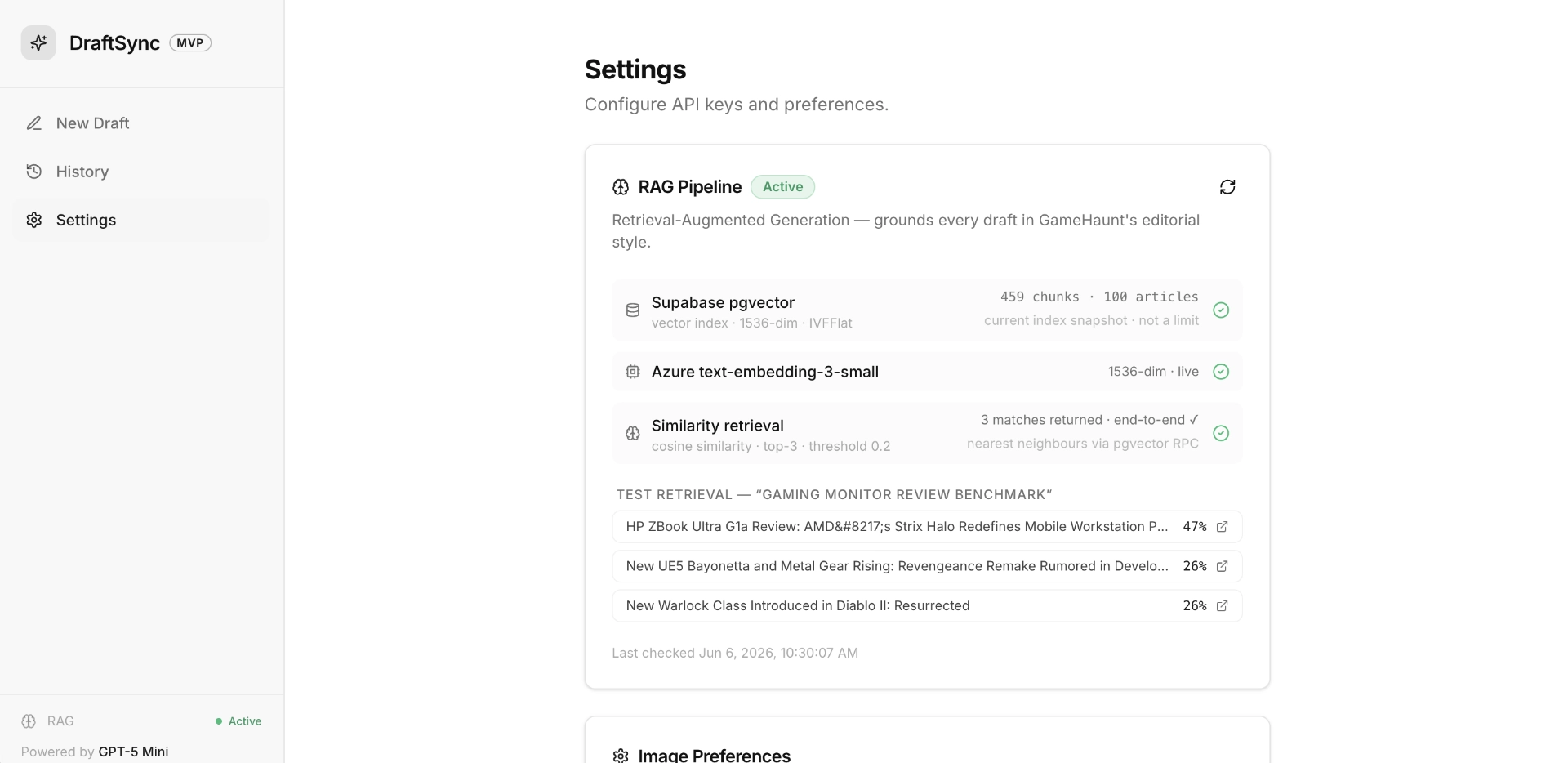
The RAG pipeline in src/lib/rag.ts solves this with cascading thresholds:
const thresholds = [0.4, 0.3, 0.2, 0.1, 0.0];

for (const threshold of thresholds) {
    const response = await supabaseServer.rpc("match_articles", {
        query_embedding: embedding,
        match_count: 3,
        similarity_threshold: threshold,
    });

    if (response.data && response.data.length > 0) break;
}

// If zero matches at all thresholds, fall back to random corpus sample
if (!data || data.length === 0) {
    const { data: fallbackRows } = await supabaseServer
        .from("article_embeddings")
        .select("content, metadata")
        .limit(3);
    // Mark as synthetic with similarity 0.05
}
The system starts strict (0.4, high precision) and progressively relaxes to 0.0 (any semantic connection at all). If every threshold returns zero matches, it falls back to a random sample from the corpus. The frontend displays the match similarity and source in a provenance badge, so the editor can see whether the style context came from a close match or a random draw.
The pgvector side uses an IVFFlat index with cosine similarity, exposed through a PostgreSQL function:
CREATE OR REPLACE FUNCTION match_articles(
    query_embedding      VECTOR(1536),
    match_count          INT     DEFAULT 3,
    similarity_threshold FLOAT   DEFAULT 0.4
)
RETURNS TABLE (id UUID, content TEXT, metadata JSONB, similarity FLOAT)
LANGUAGE plpgsql
AS $$
BEGIN
    RETURN QUERY
    SELECT ae.id, ae.content, ae.metadata,
           1 - (ae.embedding <=> query_embedding) AS similarity
    FROM article_embeddings ae
    WHERE 1 - (ae.embedding <=> query_embedding) > similarity_threshold
    ORDER BY ae.embedding <=> query_embedding
    LIMIT match_count;
END;
$$;
The ingestion side is a standalone script at scripts/ingest.ts that fetches posts from the WordPress REST API, strips HTML, chunks text into 1500-character segments with 200-character overlap, generates embeddings in batches of 100, and upserts into the article_embeddings table. The batching means partial runs are not wasted: if the script fails halfway through a large corpus, the completed batches are already in the database. This is the same ingestion pattern you would use for a content audit at scale: crawl, chunk, classify, and only then decide what to keep.
Deep Dive 4: The [[VERIFY]] System: Teaching the Model to Flag Its Own Mistakes
The central design philosophy of DraftSync is that AI output should never be presented as authoritative. The system prompt instructs the model to wrap any generated statistic, date, benchmark, or unverifiable claim in [[VERIFY: ...]] markers. The frontend then renders these as visually distinct callouts the editor must review before publishing. This is prompting for EEAT turned into system architecture: instead of hoping the model gets facts right, you build a workflow that assumes it will get some wrong and makes those failures visible.
The parsing logic in src/lib/verify.ts is straightforward but precise:
const VERIFY_TAG_PATTERN = "\\[\\[VERIFY:\\s*([\\s\\S]*?)\\]\\]";

export function extractVerifyItems(text: string): VerifyItemMatch[] {
    const items: VerifyItemMatch[] = [];
    const regex = new RegExp(VERIFY_TAG_PATTERN, "g");
    let match: RegExpExecArray | null;

    while ((match = regex.exec(text)) !== null) {
        items.push({
            raw: match[0],
            claim: (match[1] ?? "").trim(),
            index: match.index,
        });
    }
    return items;
}
The VerificationPanel component takes these extracted items and renders each one with three actions: approve (removes the tag wrapper, keeps the claim text), edit (inline text editing), or Google search (opens a search in a new tab with a smart query). The search query builder has a small heuristic: if the claim looks like a self-contained proper noun like "PlayStation Store update," it searches the exact phrase. If it looks like a fragment like "November 19, 2025," it appends the original keyword for context.
The status badge at the top of the panel shows "Ready to Export" only when every claim has been approved or edited AND the metadata fields are complete. This is a soft gate, not a hard block. The editor can still publish with unverified claims. But the system makes the state visible.
This pattern is the opposite of how most AI writing tools work. They produce output that looks finished and authoritative. DraftSync produces output that looks like a draft with annotations. The difference is philosophical: one approach optimizes for the illusion of completeness, the other optimizes for the reality of editorial judgment. It is the same argument I make in the plain language post: clarity is not dumbing things down. It is making the work visible enough to be judged.
Deep Dive 5: Two-Stage Image Generation With Transparent Fallbacks
Header images are generated through a two-stage pipeline. Stage 1 builds a heuristic prompt from keyword-aware templates. Stage 2 uses GPT-5 Mini to refine the prompt with explicit named-subject anchoring. A 12-second Promise.race timeout falls back to the heuristic prompt if the AI refinement takes too long.
The heuristic prompt builder selects a visual style based on the same editorial voice template used for text generation:
const shotByTemplate: Record<TemplateName, string> = {
    analytical: "clean product scene with technical details...",
    buyers_guide: "comparison-ready product layout...",
    breaking_news: "urgent newsroom-style cinematic scene...",
    opinion: "editorial concept art with bold composition...",
};
The FLUX.1-Kontext-pro call has its own retry chain: three attempts with 6, 10, and 12-second backoffs on 404 or 429 responses. If all three fail, the system falls back to Picsum Photos for a placeholder. Every response carries headers that expose the full chain:
x-image-provider:fluxorpicsumx-image-fallback-reason: the specific error that triggered the fallbackx-image-prompt-source:aiorheuristic
The frontend surfaces this in an info tooltip on the image. Hovering over the header reveals the prompt text, the source (AI-refined or heuristic), and the provider (FLUX or Picsum). The editor knows exactly how the image was made and can regenerate it with a single click.
Deep Dive 6: Dual-Path Persistence
Draft history saves to Supabase PostgreSQL by default. If Supabase is unreachable, it falls back to localStorage. The storage module in src/lib/storage.ts wraps both paths behind a single async interface:
export const storage = {
    async saveGeneration(record: Omit<GenerationRecord, "id" | "date">) {
        if (isSupabaseConfigured()) {
            try {
                const { data, error } = await supabase
                    .from("generations")
                    .insert({ /* ... */ })
                    .select()
                    .single();
                if (!error && data) return toRecord(data);
            } catch (e) {
                console.warn("[storage] Supabase save error, falling back:", e);
            }
        }
        // localStorage fallback
        const fallback: GenerationRecord = {
            ...record,
            id: crypto.randomUUID(),
            date: new Date().toISOString(),
        };
        lsSave(fallback);
        return fallback;
    },
};
The localStorage path keeps up to 50 entries in LIFO order. The history page loads from Supabase first, then merges in any localStorage-only entries. This means drafts written during a Supabase outage are not lost. They appear in the history page alongside the server-saved ones, and the editor can restore them when the connection returns.
Editorial Voice Rotation
One of the less visible but important features is the editorial voice system. Four templates (Analytical Deep-Dive, Buyer's Guide, Breaking News, Opinion/Editorial) are auto-selected by keyword intent rather than a manual dropdown. The heuristic in src/lib/prompts.ts matches keywords against trigger words:
analytical:    ["how", "why", "what", "explain", "guide", "tutorial"]
buyers_guide:  ["best", "review", "vs", "compare", "buy", "cheap", "top"]
breaking_news: ["release", "launch", "rumor", "leak", "announced", "new", "date"]
opinion:       ["opinion", "think", "hot take", "analysis", "future", "will"]
The selected template injects a paragraph of tonal instructions into the system prompt. The image pipeline reads the same template to choose a visual style. The frontend displays the active template as a colored badge next to the keyword input. This is a small touch, but it closes the loop: the editor can see what voice the system chose and why.
What Shipped in Three Days
Here is an honest accounting of what made it into the MVP:
- Full parallel pipeline: SEO fetch, text generation, image generation, and RAG retrieval all running concurrently with independent error boundaries
- Two-deployment retry chain for text generation with a structured fallback draft
- Two-stage image generation with FLUX.1-Kontext-pro, three-step retry backoff, and Picsum fallback
- Adaptive RAG thresholding across five similarity levels with random corpus fallback
[[VERIFY]]claim extraction, rendering, and per-claim approve/edit/search workflow- Dual-path persistence with Supabase and localStorage
- WordPress REST API publish with Markdown-to-HTML conversion and featured image upload
- RAG ingestion script with batched embedding and resumable upserts
- RAG health-check dashboard with live embedding round-trip verification
- Four editorial voice templates auto-selected by keyword intent
- Full history page with search, restore, and delete
- Settings page with RAG status and image size preferences
- 17 environment variables, all documented, all with dev fallbacks
What did not ship: authentication, an async job queue, cost monitoring, multi-image generation, and circuit breakers for provider failover. Those were explicitly deferred to Phase 2 in the sprint plan. The same content operations discipline that applies to editorial teams applies to engineering: you ship what the workflow needs first, then layer on optimization.
What I'd Do Differently
The biggest gap is testing. There are no unit tests, no integration tests, no end-to-end tests. In a three-day sprint with an open-ended spec, testing was the first thing I cut. In a real production system, I would want tests around the retry chain logic, the VERIFY tag parser, the RAG threshold cascade, and the WordPress publish flow at minimum. Those are the surfaces where a regression would be hardest to notice and most damaging.
I would also rethink the image pipeline's coupling to the editorial voice system. The template-to-visual-style mapping works for the four built-in voices, but it does not scale well. Adding a fifth voice means touching the image prompt builder, the text prompt builder, and the frontend badge component. A data-driven approach with a single voice configuration object would be cleaner.
The RAG ingestion script works but is fragile. It assumes the WordPress REST API is available and returns well-formed HTML. A production version would need retry logic, incremental ingestion (only new or updated posts), and a way to detect and skip already-embedded chunks. The current script re-ingests everything from scratch on every run.
Those critiques aside, DraftSync is the project I am most proud of from an architectural standpoint. It is not a demo that works under ideal conditions. It is a system designed to degrade gracefully under real failure modes: rate limits, timeouts, empty responses, missing API keys, database outages. Every component has a fallback. Every fallback is visible to the user. The system never lies about what it knows or how it knows it.
I did not get into the Wealthsimple program. But the three days I spent building this changed how I think about AI systems. The interesting engineering is not in making the model produce better output. It is in building the scaffolding around the model that keeps it honest.
DraftSync was built in three days for the Wealthsimple AI Builders program. The codebase reflects a focused sprint on a single question: what does it mean to build an AI system that knows what it doesn't know?